
Sales reps spend hours digging through company pages, LinkedIn profiles, news articles, and CRM notes just to send one email that may or may not land.
Some days the research pays off.
Other days it’s just noise.
That tension is exactly why B2B sales intelligence exists: to turn scattered signals about companies, buyers, and markets into something useful for real conversations.
We’ll break down what B2B sales intelligence means, the data behind it, the tools that power it, and how teams use it to make smarter selling decisions.
Key Notes
- Six core sales intelligence data types determine targeting accuracy, outreach relevance, and pipeline prioritization.
- Signal clusters combining fit, intent, and timing outperform single signals for account prioritization.
- Effective systems embed sales intelligence directly into CRM workflows to drive real rep behavior.
What Is B2B Sales Intelligence?
B2B sales intelligence is the discipline and tooling behind collecting, consolidating, and using sales intelligence data to make better selling decisions.
Not “more information.”
Better decisions.
That sounds obvious, but it isn’t.
Most Teams Confuse Sales Intelligence With:
- Market research (broad trends, not account-specific next steps)
- Competitive intelligence (important, but it is a slice of the whole)
- Lead lists (names without context)
Sales intelligence is different because it is meant to be actionable.
A Clean Way To Frame It:
Intelligence = Fit + Intent + Timing + Next Action
- Fit: Should we be selling to them at all?
- Intent: Are they showing signals that they care right now?
- Timing: Is this a “this week” problem or a “next quarter” problem?
- Next action: What should the rep do next, specifically?
What Is The Role Of Sales Intelligence?
- For SDRs, sales intelligence helps you stop guessing which accounts are worth your time and what to lead with.
- For managers, it helps you stop coaching activity volume and start coaching what moves deals.
That’s the real promise: not better research. Better execution.
Why B2B Sales Intelligence Matters Now
Here’s what sales intelligence is usually replacing:
- Research that is slow and inconsistent
- Outreach that looks personalized but is basically generic
- Follow-up that happens too late
- Deal reviews that happen after the miss
And it creates a better version of reality:
- SDRs build lists with actual reasoning
- SDRs prioritize by signals, not by whoever is loudest on Slack
- Managers coach on what reps did with the intel
- Forecasts are driven by evidence, not optimism
Sales Intelligence Data
Sales intelligence only works if the data is both rich and usable.
- Rich means you can see the full picture.
- Usable means you can trust it enough to act.
Here are the core data types, what they mean, and what they are good for:
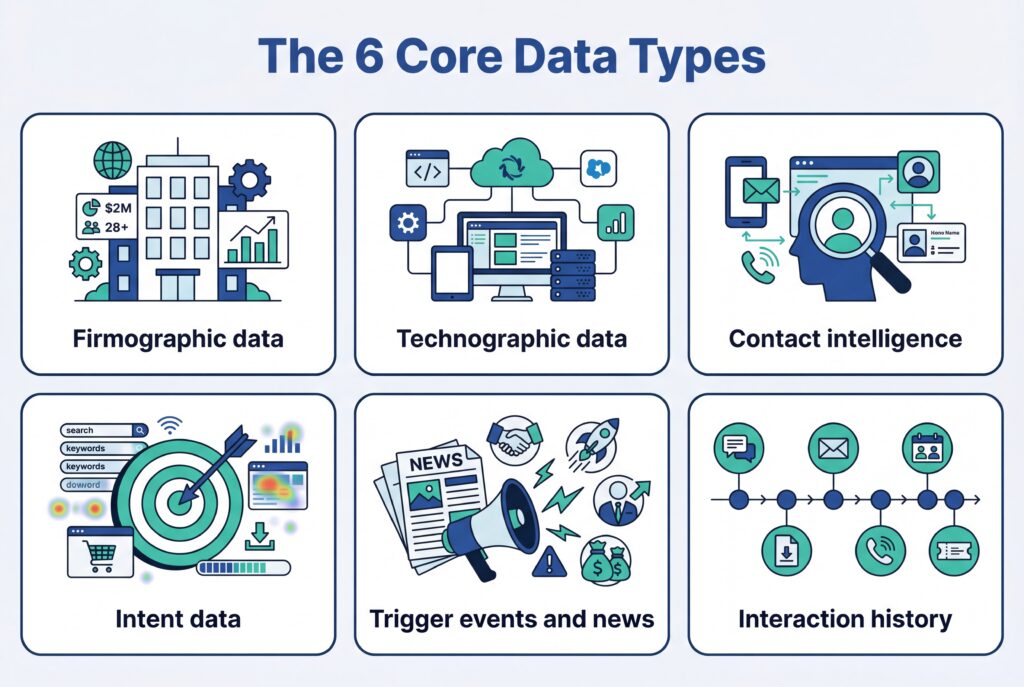
1) Firmographic data
Company attributes like industry, size, revenue band, location, structure.
Use it for:
- ICP filters
- territory and account segmentation
- avoiding bad-fit lists that look “big” but never convert
2) Technographic data
What systems they run. CRM, ERP, marketing automation, cloud stack.
Use it for:
- fit signals (do they have the systems your product plugs into?)
- displacement angles (are they using an incumbent you replace?)
- more specific messaging than “we integrate with everything”
3) Contact intelligence
People data. Names, titles, emails, role, org structure cues.
Use it for:
- mapping the buying group
- avoiding the classic mistake: emailing the wrong level and calling it “no interest”
4) Intent data
Behavior that suggests buying interest.
This can include first-party signals like:
- pricing page views
- content downloads
- email engagement
- webinar attendance
And third-party signals like:
- keyword research behavior across publisher networks
- category comparisons
- content consumption tracked by partners
Use it for prioritization, timing, and triggering plays.
5) Trigger events & news
A change that creates urgency.
Examples:
- funding
- leadership change
- hiring spikes
- M&A
Use it for:
- creating a reason to reach out that is not fake
- sequencing timing (some triggers decay fast)
6) Interaction history
Your internal touchpoints and engagement.
Use it for:
- preventing duplicated outreach
- knowing what has already been tried
- understanding momentum (or the lack of it)
Quick clarity: firmographic vs technographic vs intent
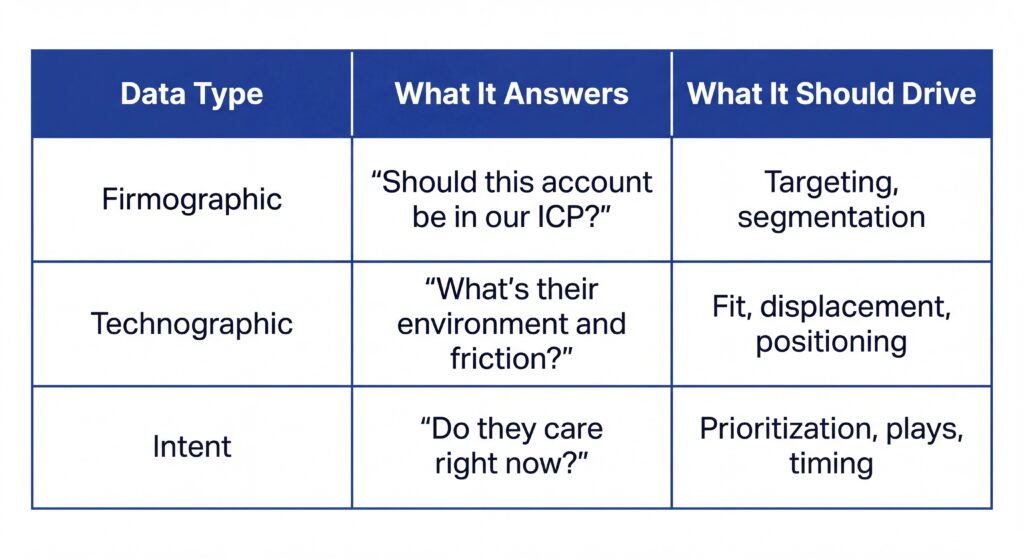
This is worth getting right because teams mix these up constantly.
A firmographic match is not intent.
A tech stack match is not urgency.
Intent without fit is a trap.
First-party vs third-party intent (& how to treat them)
First-party intent is narrower, but cleaner. You saw it on your own properties.
Third-party intent is broader, but noisier.
A practical rule:
- Treat first-party intent as “take action now.”
- Treat third-party intent as “investigate and validate.”
Data quality & governance (the part most teams skip)
Data quality is the Achilles’ heel of sales intelligence.
Common issues:
- stale records (people move roles, companies reorganize)
- duplicates
- missing fields
- bad validation (wrong formats, dead emails)
One bounced list can waste a week.
A simple governance loop helps:
1) Define critical fields
For SDR workflows: industry, employee band, tech stack tags, direct dial if you use calling
2) Set validation rules
- required fields
- formatting
- picklists where needed
3) Dedupe and normalize
- standard company naming
- merge logic for contacts
4) Refresh cadence
What gets refreshed weekly vs monthly vs quarterly
5) Assign an owner
Usually:
- RevOps
- SalesOps
- or a designated data steward
If nobody owns it, it rots.
Where Sales Intelligence Fits in the Sales Cycle
Sales intelligence is not one use case. It changes based on where you are in the cycle.
The mistake is treating it like a one-time research burst before outreach.
Stage 1: Targeting and list building (SDR)
Your job is not to build the biggest list, but to build the list you can win.
Use intelligence to:
- filter by ICP firmographics
- add technographic constraints (or opportunities)
- exclude common “time-wasters” based on what you already know about your motion
A manager-level checkpoint worth adding:
- What percent of our outbound list matches ICP, on paper?
- What percent matches ICP plus at least one relevant stack signal?
If you cannot answer that, you are not doing targeting.
You are doing hope.
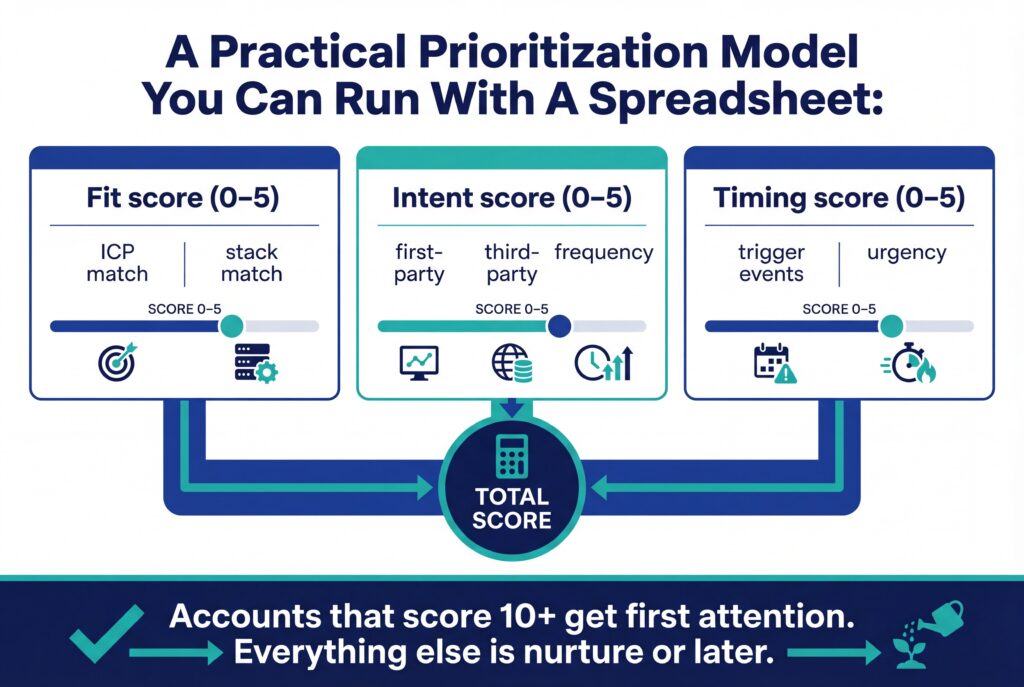
Stage 2: Prioritization and timing (SDR + manager)
Prioritization is where sales intelligence pays for itself (but only if you stop worshipping single signals).
A pricing page view might mean curiosity.
A hiring spike might mean chaos.
The better move is signal clusters.
Example cluster:
- third-party intent spike in your category
- plus a trigger event (funding)
- plus a technographic fit (uses the platform you integrate with)
That is a real reason to go now.
Stage 3: Personalization that doesn’t waste time (SDR)
Personalization is not “write a custom paragraph.”
It is “choose a relevant angle and prove you did your homework.”
Sales intelligence helps you pick angles quickly:
- Tech stack angle: “Saw you are on Salesforce and [adjacent tool]. Here’s where teams usually get stuck…”
- Trigger angle: “Congrats on the Series B. Usually the next 90 days turn into hiring, process changes, and messy handoffs…”
- Intent angle: “Noticed your team has been researching [category]. Here are the three questions teams ask before they choose…”
The trick is repeatability.
Build a small library of angles tied to signals. Teach SDRs how to spot the signal, pick the angle, and write the opener.
That is how you scale personalization without burning out your team.
Stage 4: Qualification & deal progression (manager)
Sales intelligence does not stop when the meeting is booked.
This is where managers can use it to prevent “single-threaded deals.”
Use intelligence to:
- map stakeholders (who else matters?)
- understand influence paths (who will block?)
- catch competitor presence early
A simple consequence: if you spot that a competitor is already embedded, your discovery and messaging needs to change.
You cannot run the same script.
Stage 5: Forecasting & pipeline inspection (manager)
Forecasts slip for predictable reasons.
One of them is relying on CRM stage progression as if it equals buyer progress.
Sales intelligence can improve forecasting because it introduces signals like:
- multiple stakeholders engaged
- repeated intent behavior
- consistent interaction momentum
- trigger events that align with purchase timing
You are basically moving from “what the rep says” to “what the evidence suggests.”
This is also where manager coaching gets sharper
You can ask:
- What signals say this is real?
- What signals say it is stalling?
- What do we need to do next to create movement?
That’s a very different pipeline review.
Sales Intelligence CRM Integration
If sales intelligence lives outside the CRM, adoption dies.
Reps do not wake up excited to open another platform. They follow the path of least resistance.
What a good integration means
A good sales intelligence CRM setup means:
- Sales intelligence data enriches CRM objects (accounts, contacts, opportunities)
- Signals create tasks, alerts, or play triggers
- Reps can act without leaving their workflow
The goal is not “we have the integration” but “the integration changes behavior.”
Real-time enrichment
Real-time enrichment is the quiet workhorse.
It keeps contact details, titles, and firmographics current. It prevents wasted sequences and wrong numbers.
A practical approach:
- enrich on record creation
- enrich on key lifecycle changes (lead to opp)
- schedule refresh jobs for high-value segments
Workflow examples you can steal
Workflow 1: New Lead Created
- Lead enters CRM
- Enrichment fills firmographic and contact fields
- Lead routed based on ICP rules
- Sequence suggestions appear based on segment
Workflow 2: Intent Spike On A Target Account
- Intent score crosses a threshold
- CRM task created for account owner or SDR
- Slack alert goes to the right channel (not everyone)
- A play checklist is attached to the task
Workflow 3: Opp Created
- Opportunity opens
- SI stops “top of funnel” scoring
- System shifts to stakeholder mapping and risk signals
Common integration pitfalls
- Field mapping is messy, so the CRM fills with junk fields nobody trusts
- Sync conflicts create duplicate accounts
- Signals are visible, but not actionable
If you want one blunt truth:
Integration is not a technical project. It is an operating design decision.
B2B Sales Intelligence Tools
Good B2B sales intelligence tools typically include:
- automated aggregation
- enrichment
- intent and trigger detection
- search and filtering
- scoring and analytics
- integration with CRM and marketing systems
A basic database gives you contacts.
A sales intelligence system gives you prioritization and next steps.
Tool categories
You can map the market into categories. Many vendors overlap, but this structure helps you choose intentionally.
- Data and enrichment providers. Deep contact databases, firmographic coverage, enrichment APIs
- Intent and signal platforms. In-market behavior and alerts
- ABM account platforms. Target account orchestration across sales and marketing
- Sales engagement suites. Cadences and sequencing powered by data and signals
- Conversation and revenue intelligence. Call insights, pipeline health, forecast analytics
- CRM-embedded intelligence. Native scoring and insights inside the CRM
- Prospecting extensions. Browser tools for contact discovery and verification
How to use these categories without overbuying
A common mistake is stacking tools that do the same thing.
A better approach is pairing categories by role:
- SDR team: enrichment + prospecting extension + engagement suite
- Manager team: conversation intelligence + forecast/pipeline tooling
- ABM motion: intent + ABM orchestration + CRM integration
If you cannot explain why a tool exists in your stack, it probably should not.
EnableU Deal Pilot – Signal-Driven Deal Intelligence
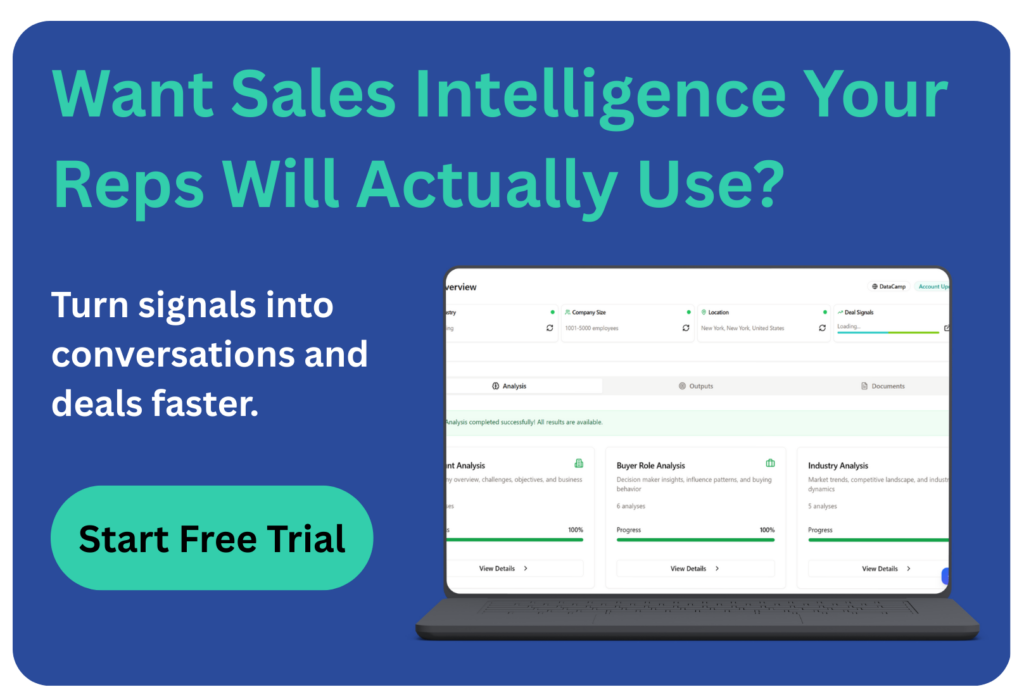
EnableU’s Deal Pilot fits into the sales intelligence stack as the layer that turns raw signals and research into actionable guidance during real deals.
- Generates account, persona, and industry analysis in minutes for faster account planning
- Surfaces buying signals, stakeholder insights, and discovery questions before and during conversations
- Provides real-time coaching and next-best-action prompts so reps act on intelligence instead of just collecting it
In practice, it behaves less like a database and more like a sales companion that converts intelligence into execution.
Measuring ROI & Performance Impact
You do not need perfect attribution.
You do, however, need clear before-and-after metrics.
KPIs for SDR teams
Track what changes behavior and output.
- research time per account
- meeting rate per priority account
- reply rate by signal tier
- conversion from meeting to qualified opportunity
A high-leverage metric: % of meetings sourced from signal-backed accounts.
If that number moves up, your pipeline quality usually follows.
KPIs for sales managers
Managers should track outcomes that reflect predictability.
- pipeline velocity
- stage progression consistency
- forecast variance
- win rate by segment
Simple ROI formula
ROI = (Incremental gross profit from uplift − Tool cost) ÷ Tool cost
Where uplift comes from:
- more qualified meetings
- better conversion rates
- shorter cycle times
Even if you estimate conservatively, the decision becomes clearer.
Frequently Asked Questions
What’s the difference between sales intelligence and a sales intelligence CRM?
Sales intelligence provides the data, signals, and insights about accounts, buyers, and buying intent. A sales intelligence CRM is where that intelligence gets embedded into workflows, records, and pipeline management. In practice, the two work together: intelligence fuels the CRM, and the CRM operationalizes it.
How does B2B data integration improve sales intelligence accuracy?
B2B data integration connects intelligence platforms with systems like CRM, marketing automation, and analytics tools. This ensures data flows consistently across the stack, reducing duplicates and stale records while giving teams a more complete picture of accounts and buying signals.
What makes a good sales intelligence company?
A strong sales intelligence company delivers accurate data, meaningful signals, and seamless integrations with tools your team already uses. The real test is usability: reps should be able to turn insights into outreach, account plans, or deal actions without leaving their workflow.
Can small sales teams benefit from B2B sales intelligence tools?
Yes. Smaller teams often benefit the most because they have limited time and resources. B2B sales intelligence tools help them focus on the highest-fit accounts, prioritize outreach using signals, and reduce manual research, making every hour of selling more productive.
Conclusion
B2B sales intelligence only matters if it changes what happens in the next conversation.
The data itself is not the win. The win comes from using firmographic, technographic, intent, and trigger signals to target the right accounts, prioritize real buying momentum, and guide what reps do during outreach, discovery, and deal reviews.
The teams that benefit most treat B2B sales intelligence as part of their operating system, rather than just a research step. This results in cleaner pipelines, better conversations, and fewer hours lost to guessing or scattered tools.
If you want to see what this looks like in practice, start a free trial of Deal Pilot. It turns B2B sales intelligence into real-time account analysis, buyer insights, and next-step guidance so your team can walk into every conversation already prepared.