
One thing is true in 2026: Most cold emails fail before the reader even registers what you’re selling.
Not because your product is bad.
Not because cold email is “dead.”
Because the email reads like it came from a factory.
This guide fixes that.
Here’s your library of cold email templates for sales + the mechanics that make a sales cold email earn replies in modern inboxes.
Key Notes
- High-performing sales cold emails follow a simple structure: trigger, relevance, outcome, and clear next step.
- Different outreach situations require different templates (referral, trigger-based, value-led, and breakup emails).
- Short, role-aware messaging consistently outperforms long product-led sales email templates.
Anatomy of a high-converting sales email template
Most of the “best cold email template for sales” posts give you copy blocks.
Copy is the surface.
Underneath, high-performing cold outreach templates follow the same physics: the reader should understand why you’re emailing them, what you’re pointing to, and how to respond within a few seconds.
Subject lines that get opened
Subject lines are not where you win. They’re where you avoid losing.
Good subject lines tend to be:
- Short. Often 1 to 4 words.
- Neutral. No hype or clickbait.
- Specific enough to feel intentional.
A few reliable patterns:
- “Quick question” (simple, but overused in some markets)
- “[Company] + [Outcome]”
- “[Role] idea”
- “Re: [trigger]”
Avoid exclamation marks, heavy emojis, and fake urgency. If you need those to get opened, your list or your positioning is off.
The opening line: why you, why now
The first line is your bouncer.
If it reads like a template, you’re done.
Strong openers usually do one of three things:
- Reference a trigger (funding, hiring, new product, expansion)
- Reference a role-specific reality (a common pain that isn’t generic)
- Reference a relevant artifact (a post, a talk, a job description, a customer story)
The trick is not “personalization” but relevance.
Personalization that gets replies
Most reps either do zero personalization and blast; or do deep research and send 20 emails a day.
Neither scales.
What works is personalization stacking:
- One company fact (trigger or direction)
- One role reality (what someone in that seat gets measured on)
- One specific outcome you can credibly influence
That’s enough to sound like you did your homework without turning your day into an archaeology project.
The value prop: outcomes, not brochures
Cold emails die when they sound like a product page.
Instead of: “We provide a comprehensive platform that…”
You want: “Teams like yours cut ramp by 30 to 50% by enforcing discovery and follow-ups in workflow.”
Outcome first.
Then the mechanism in one line.
CTAs that reduce friction
Most CTAs are too big.
“Book 30 minutes” is a lot to ask from someone who doesn’t know you.
Better CTAs are:
- Yes/no
- “Worth a quick chat?”
- “Should I send a short teardown?”
- “Open to a 10-minute sanity check?”
The point is to make replying feel easy.
Length & tone
A solid B2B cold email template is often:
- 3 to 6 short lines
- Under 125 words
- Readable on mobile
Tone wise, aim for “smart internal note” rather than sounding like a marketing email.
Before you copy-paste: build your inputs (so templates convert)
Templates fail when your inputs are vague.
If you don’t know who you’re targeting and why they should care, the best sales email template in the world won’t save you.
The 3-input checklist (use this before sending)
- Segment: Who exactly is this for? Role, seniority, and a clear ICP slice
- Reason now: What changed or what pressure exists today? Trigger, timing, or an observable shift
- Single outcome: What is the one improvement you’re claiming? Not five features. One outcome.
If you can’t answer those, pause.
5-minute research plan (fast personalization)
You don’t need a rabbit hole.
You need a signal.
2 minutes: LinkedIn
- Role, tenure, and a recent post if available
2 minutes: Company
- Hiring trend, product update, funding, new markets
1 minute: Industry
- One pressure point that’s real right now
Then pick one detail to reference and one detail to imply. That’s usually enough.
Persona tweaks (same offer, different angle)
This is where most SDRs accidentally flatten their message.
Same product. Different buyer.
- Exec: risk, time, ROI, predictability
- Manager: team output, coaching leverage, clean handoffs
- RevOps: data trust, adoption, workflow integrity
Your template should hold the skeleton. The angle changes.
The template library: 15 cold prospecting email templates
Here are cold prospecting email templates you can copy, paste, and adapt.
A note before you do:
Don’t treat these as magical spells. Treat them as proven structures.
Your job is to feed them the right inputs.
Each template includes:
- Best for
- Subject options
- Sample cold email
- Personalization slots
- Why it works
First-touch templates (5)
Template 1: The Trigger Email (funding, hiring, launch)
Best for: When something changed and you can credibly tie it to a sales execution problem.
Subject options:
- Re: the hiring push
- Growth plans
- Quick question
Email:
Hi {{FirstName}},
Saw {{Company}} is {{trigger: hiring AEs / raised funding / launching X}}.
When teams make that jump, the first thing that breaks is consistency. Messaging drifts. Pipeline gets noisy. Forecast slips.
If it’s useful, I can share a 10-minute play that teams use to keep execution tight during growth.
Worth sending over?
Thanks, {{YourName}}
Personalization slots:
Trigger + one role-specific KPI
Why it works:
It starts with a real “reason now” and frames a common consequence without sounding generic.
Template 2: The Pain Snapshot (PAS, but subtle)
Best for: When the pain is common and you can describe it in an operator way.
Subject options:
- Stage 3 risk
- Pipeline hygiene
- Quick thought
Email:
Hi {{FirstName}},
A lot of {{role}} teams are seeing the same pattern right now: stage progression looks healthy, then late-stage deals stall for reasons that were visible earlier.
It usually comes down to a few missed behaviors – multi-threading, clear next steps, and real qualification.
Curious if that’s showing up at {{Company}} too. If yes, I can send a short checklist we use to spot it early.
Should I?
Thanks, {{YourName}}
Why it works:
It names a specific failure mode and offers a low-friction asset.
Template 3: The Peer Proof Email (one proof point)
Best for: When you have one relevant customer result or benchmark.
Subject options:
- What we saw work
- Ramp time
- Re: coaching
Email:
Hi {{FirstName}},
We’ve been working with teams who wanted to improve {{metric: ramp / win rate / forecast variance}} without adding more meetings or more admin.
The lever showed results were simple: guidance and coaching in the workflow, tied to specific behaviors.
If you’re open, I can share the exact 3 things they enforced that cut ramp by {{number}}.
Worth a quick chat, or prefer I email the breakdown?
{{YourName}}
Why it works:
It’s specific, it avoids logo dumping, and it gives two easy ways to respond.
Template 4: The Minimalist “Idea for you”
Best for: Senior personas or inboxes that punish fluff.
Subject options:
- {{Company}} idea
- Quick thought
- Question
Email:
{{FirstName}},
Noticed {{specific: trigger/post/hiring}}.
If your team is pushing on {{goal}}, there’s usually a fast win in tightening {{one behavior}}.
Want the play?
{{YourName}}
Why it works:
It respects time. It forces you to be sharp.
Template 5: The Lead Gen Offer (resource / invite)
Best for: Lead generation email template approach without sounding gated-content-y.
Subject options:
- Quick resource
- For your team
- Template
Email:
Hi {{FirstName}},
I put together a short set of cold outreach templates that SDR teams use to get higher reply rates without sounding automated.
It includes:
- 5 first-touch emails
- 3 follow-ups that don’t annoy people
- a simple personalization checklist
Want me to send it?
Thanks, {{YourName}}
Why it works:
Clear value, clear contents, low-friction ask.
Follow-up templates (5)
Follow-ups are where discipline shows.
Most inboxes won’t reply on touch one. They might on touch two. They often do when you follow up with a new angle that still respects their time.
Template 6: The Simple Bump
Subject: Re: {{original subject}}
Hi {{FirstName}},
Bumping this in case it got buried.
Still worth sending the {{asset / play / checklist}}?
{{YourName}}
Why it works:
Short and polite. No new claim.
Template 7: The Yes/No Bump
Subject: Quick yes/no
Hi {{FirstName}},
Should I close the loop on this, or is it worth a quick chat?
{{YourName}}
Why it works:
Makes replying effortless.
Template 8: The Value-Add Follow-Up
Subject: One data point
Hi {{FirstName}},
Quick add.
We’ve seen teams improve reply rates when the first line is a real trigger and the CTA is a yes/no. Most cold emails fail because the reader can’t tell why they’re receiving it.
If helpful, I can send 3 subject lines and an opener you can test for {{Company}}.
Want that?
{{YourName}}
Why it works:
You add value without turning it into a blog post.
Template 9: The New Angle Follow-Up
Subject: Different angle
Hi {{FirstName}},
Last note from me.
If the goal right now is {{goal}}, the hidden tax is usually {{cost: manager time / pipeline noise / late-stage slippage}}.
If you want, I can send a quick framework to diagnose where it’s leaking.
Worth it?
{{YourName}}
Why it works:
Reframes the problem without repeating the first email.
Template 10: The Breakup Email
Subject: Close the loop?
Hi {{FirstName}},
Seems like timing isn’t right.
I’ll close the loop for now. If improving {{metric}} becomes a priority later, happy to share what we’ve seen work.
Should I check back in a few months, or leave it here?
{{YourName}}
Why it works:
Polite, gives control, often triggers a response.
Advanced templates (5)
These are for when you’re running tighter lists, higher ACVs, or you’re targeting buyers who can smell generic copy from orbit.
Template 11: The Micro Case Study (2 to 3 observations)
Subject: Noticed something
Hi {{FirstName}},
Looked at {{Company}}’s {{artifact: careers page / GTM motion / product messaging}} and noticed:
- {{Observation 1}}
- {{Observation 2}}
- {{Observation 3}}
If I’m right, that usually shows up as {{consequence}}.
Want me to share a quick fix teams use to clean this up?
{{YourName}}
Why it works:
It’s hard to ignore something specific.
Template 12: The Scenario Email (paint the picture)
Subject: A quick scenario
Hi {{FirstName}},
Imagine you’re in stage 3.
The deal looks healthy. Then procurement shows up, the champion goes quiet, and the next step slips by two weeks. Again.
Teams fix that when they enforce a few behaviors early, not when they panic late.
If you want, I can share the exact behavior checklist.
Worth sending?
{{YourName}}
Why it works:
It’s vivid and grounded. It mirrors real sales life.
Template 13: The Multi-Thread Starter
Subject: Buying group map
Hi {{FirstName}},
Quick question.
When deals stall at {{Company}}, is it usually because:
- the wrong stakeholders are involved too late
- or the right ones never got engaged at all
If that’s a real issue, I can send a simple buying group map template SDR teams use to multi-thread faster.
Want it?
{{YourName}}
Why it works:
It’s a diagnosis question with a practical offer.
Template 14: The Re-Engagement Email (old lead, new reason)
Subject: Reconnecting
Hi {{FirstName}},
We spoke a while back about {{topic}}.
Since then, a lot of teams have been tightening execution around {{new pressure}} because it’s impacting {{metric}}.
If it’s back on the radar at {{Company}}, I’m happy to share what we’re seeing work right now.
Worth a quick check-in?
{{YourName}}
Why it works:
It respects history and gives a new reason to respond.
Template 15: Permission to Close the Loop
Subject: Should I stop?
Hi {{FirstName}},
I don’t want to be noise.
If improving {{outcome}} isn’t a priority, tell me and I’ll stop reaching out.
If it is, what’s the right next step from your side?
{{YourName}}
Why it works:
Clean, human, and it forces an honest response.
Sequencing: how to run these templates as a system
A good cold email is a moment.
A good sequence is a system.
Here’s a simple default you can run without wrecking deliverability or annoying people:
The default 3-email sequence
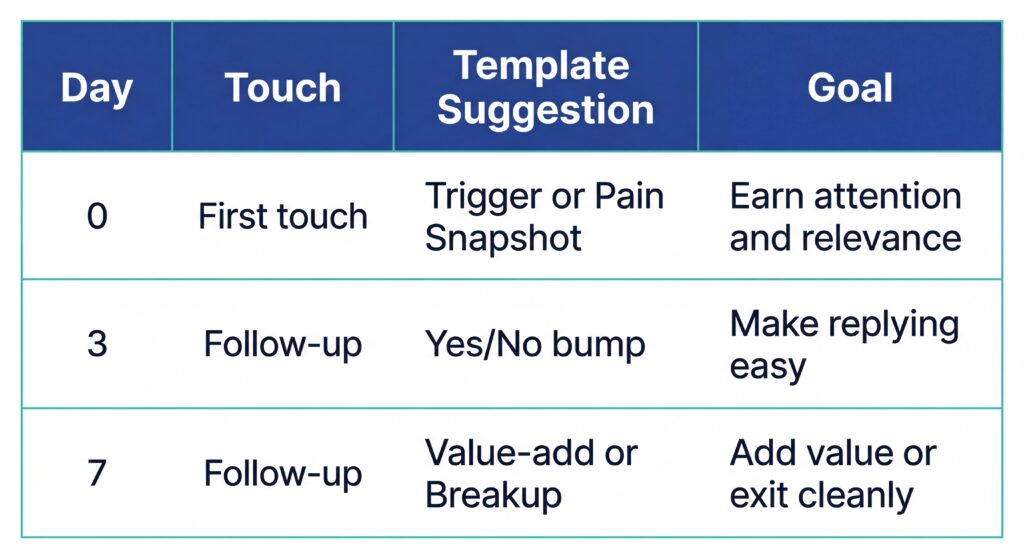
If you’re targeting enterprise or a named account, you can pair this with a LinkedIn view or a light call touch. Just don’t pretend it’s “multi-channel” if it’s random activity.
When to extend (& when to stop)
More touches can work.
But there’s a cost:
- You risk spam complaints
- You train the buyer to ignore you
- You burn domain reputation
If you’ve sent 3 emails and they’re silent, it’s usually one of three things:
- Wrong person
- Wrong timing
- Wrong message
Don’t solve that with email #9.
Segmentation rules (so you don’t blast everyone)
Segmenting is how you avoid generic.
Three ways to segment fast:
- By role: SDR manager vs VP Sales is a different conversation
- By trigger: hiring spree vs stalled growth
- By deal motion: transactional vs complex buying group
Then pick one template family and run it consistently.
Deliverability: protect your inbox so people see your emails
This is the part everyone ignores until things break.
If your emails don’t land, your copy doesn’t matter.
Infrastructure essentials (non-negotiable)
At minimum, your outbound setup needs:
- SPF
- DKIM
- DMARC
If you don’t know whether you have those, assume you don’t.
And yes, you should warm new domains and mailboxes. Slowly. Predictably.
Sending limits & rotation
If you’re doing cold outreach at scale, you need to think like an operator.
General rules of thumb:
- Keep daily volume per mailbox sensible
- Space sends
- Rotate mailboxes if your volume requires it
The point is stability.
Copy hygiene (avoid spam filters)
Cold emails get flagged for two reasons:
- The infrastructure is shaky
- The copy looks like spam
Copy hygiene basics:
- Don’t stuff links into first touch
- Avoid attachments
- Keep formatting clean
- Avoid spammy terms and aggressive promises
Also, don’t add 14 tracking links and then wonder why deliverability tanked.
Optimization: improve reply rates without guessing
Most teams “optimize” cold email by swapping templates.
That’s random.
You want a loop.
Metrics that matter
Track:
- Positive replies / total sends
- Meetings booked / total sends
- Pipeline created / total sends
If you can tie this back to segment and template type, you can actually improve.
A/B testing framework (one variable at a time)
Pick one variable:
- Subject line
- Opening line
- CTA
Keep everything else the same.
Run it long enough to learn something, then change the next thing.
Scaling without losing quality
Scaling does not mean sending more.
It usually means sending better to tighter segments.
Practical ways to scale:
- Trigger-based lists
- Personalization stacking (not deep research)
- Template families by persona
This is how you get more replies without killing your day.
Compliance & ethics for B2B cold email
You don’t need to be perfect, but you do need to be responsible.
Minimum standards
- Use real identity and company info
- Provide an easy opt-out
- Respect “no” immediately
The line you don’t cross
Cold email fails long-term when buyers feel tricked.
Avoid:
- Fake familiarity
- Invented proof
- Aggressive pressure
- Endless follow-ups
Trust is a conversion lever.
Frequently Asked Questions
What makes a good cold email example for B2B sales?
A good cold email example focuses on relevance and clarity rather than clever copy. The best messages reference a real trigger, connect it to a role-specific challenge, and ask for a small next step. Strong good cold email examples feel like a thoughtful note from a peer, not a mass outreach campaign.
How long should a sales cold email be?
A high-performing sales cold email is usually under 125 words and fits comfortably on a mobile screen. The goal is quick comprehension: why you’re reaching out, what outcome you’re pointing to, and how the recipient can respond. If the message requires scrolling, it’s usually too long.
What is the best lead generation email template for outbound sales?
The best lead generation email template offers immediate value rather than pitching a product. This often means sharing a checklist, insight, or short framework relevant to the buyer’s role. When the email teaches something useful, prospects are more likely to respond or request more information.
How many cold prospecting email templates should a sales sequence include?
Most effective cold prospecting email templates are used within a short sequence of 3–5 touches. This typically includes a first-touch email, one or two follow-ups, and a polite breakup message. Each message should introduce a slightly different angle to maintain relevance without repeating the same pitch.
Conclusion
Cold outreach works when the email earns its place in the inbox.
The patterns in this guide show the difference:
- Strong subject lines avoid noise.
- The opening line answers why the message exists.
- Personalization connects the message to a real pressure the buyer cares about.
And the cold email template for sales itself stays simple: a clear observation, a credible outcome, and a low-friction reply.
If researching accounts and writing personalized outreach is slowing you down, try Deal Pilot. Start a free trial to generate buyer analysis, company research, and contextual messaging in minutes so your next cold email starts with real signal instead of a blank screen.